Best settings for this AI image prompt
Aspect ratios4:5, 3:4, 2:3
Best modelsChatGPT image generation
Portrait prompt
Copy a curated Stylish Vintage Newspaper Cover Prompt for ChatGPT image generation with examples, negative prompt and practical tips.
Copy the Stylish Vintage Newspaper Cover instructions, then tune vintage newspaper front-page cover and black-and-white press photography only where your source image needs adjustment.
Turn the uploaded portrait into a stylish vintage newspaper cover. Keep the face recognizable, add black-and-white press photography, bold headline layout, halftone print texture, old paper grain, editorial columns, and a classic front-page design. Use a front-page crop with the portrait as the main image, strong newspaper masthead, balanced editorial columns, believable ink texture, aged paper tone, and clean vintage print composition.
These examples show how uploaded portraits can become stylish vintage newspaper covers while preserving the main facial identity. The improved prompt adds black-and-white press photography, bold headline hierarchy, halftone texture, old paper grain, editorial columns, and a classic front-page layout.

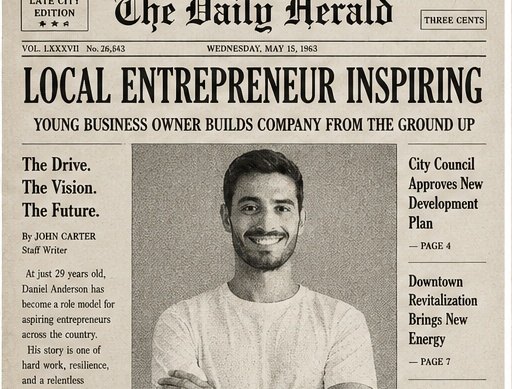

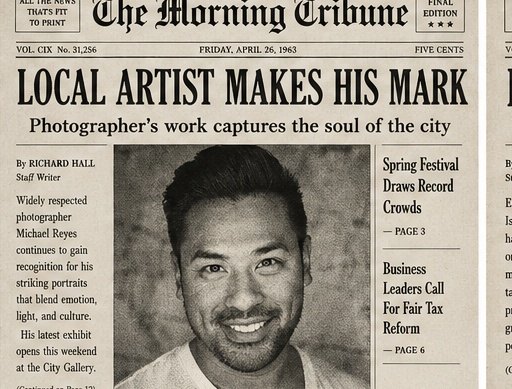
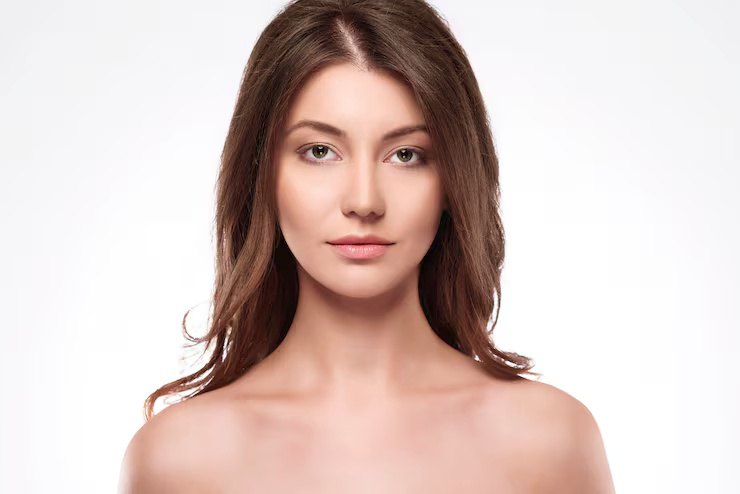
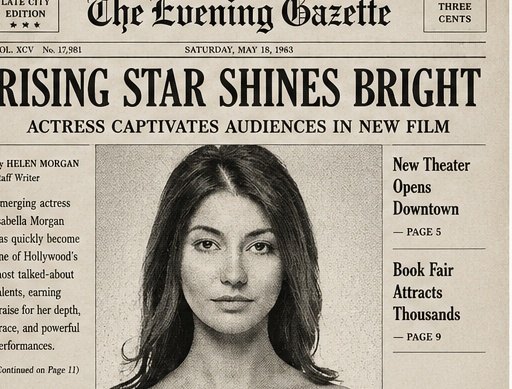
Make this portrait look like an old newspaper.
Each Stylish Vintage Newspaper Cover variation changes the finish or crop while retaining the core vintage newspaper front-page cover direction.
Turn the uploaded portrait into a classic black-and-white newspaper front page. Keep the face recognizable, add a bold masthead, large headline, editorial columns, halftone print texture, old paper grain, and a believable vintage press layout.
Transform the uploaded portrait into a 1960s city newspaper cover story. Keep the person recognizable, use black-and-white press photography, old paper tone, serif headlines, column text blocks, subtle ink bleed, and a classic local-news front-page composition.
Create a dramatic vintage tabloid newspaper cover from the uploaded portrait. Keep the face recognizable, add high-contrast black-and-white press lighting, oversized headline typography, halftone texture, aged paper, column boxes, and strong front-page energy.
Turn the uploaded portrait into an elegant vintage newspaper arts-section cover. Keep the face recognizable, add refined black-and-white portrait photography, a stylish headline, editorial column layout, soft paper grain, halftone texture, and classic newspaper design.
Create a historical archive newspaper cover using the uploaded portrait. Preserve facial identity, add old press-photo grain, bold headline structure, dated newspaper masthead, article columns, worn paper edges, halftone dots, and a timeless front-page layout.
For Stylish Vintage Newspaper Cover, adjust one field per trial so changes to vintage newspaper front-page cover remain distinguishable from changes to black-and-white press photography.
| Parameter | What to change | Expected effect | Example value |
|---|---|---|---|
| Subject or scene | Replace the main subject while keeping the prompt structure. | Changes the focal content without discarding the composition. | Stylish Vintage Newspaper Cover |
| Visual style | Change the style phrase. | Moves the result toward a different material or art direction. | vintage newspaper front-page cover |
| Lighting | Replace the lighting description. | Changes contrast, depth, color temperature and mood. | black-and-white press photography, halftone print contrast, aged paper tone |
| Camera and composition | Adjust lens, angle, crop or focal point. | Changes perspective and the amount of environment in frame. | front-page editorial portrait crop |
| Output format | Choose an aspect ratio supported by your image tool. | Adapts the framing for a post, poster or landscape image. | 4:5, 3:4, 2:3 |
changed identity, distorted face, extra fingers, bad hands, warped eyes, plastic skin, modern glossy magazine style, neon colors, messy newspaper layout, unreadable tiny text, fake logo, watermark, low-resolution print, blurry portrait, duplicated face
Yes. Upload a clear portrait and use this prompt to guide the image toward a black-and-white front-page newspaper design while keeping the face recognizable.
Use a sharp portrait with visible eyes, face shape, and hairstyle. Keep the identity instruction in the prompt and avoid adding too many unrelated effects.
A strong masthead, bold headline layout, halftone texture, old paper grain, editorial columns, and black-and-white press photography create the classic newspaper mood.
AI text inside images can still be imperfect. Treat the generated headlines and columns as visual design elements, or replace the text later in an editor if exact wording matters.
A clean portrait with the person facing the camera works best. Avoid heavy filters, sunglasses, motion blur, or extreme crops that hide the face.
Yes. Add details such as 1930s newspaper, 1960s city press, tabloid front page, political portrait cover, or arts section feature.
Yes. It helps reduce distorted faces, messy layouts, unreadable tiny text, fake logos, duplicated portraits, and overly modern design details.
Use 4:5 or 3:4 for a portrait-focused cover, and 2:3 when you want more newspaper masthead and column layout around the person.
Author: Image Prompt List Editorial Team. This is the site editorial team, not a fictional individual expert.
For Stylish Vintage Newspaper Cover, editors checked the stored prompt and available examples for topic fit, pair order, captions, metadata, duplicates and unsupported claims. Formatting checks can be automated; this approval covers the documented vintage newspaper front-page cover and black-and-white press photography evidence, not an unreported independent model rerun.
Last updated: May 26, 2026.
Read the editorial methodology or report an error.