Cinematic Detective Character Portrait Prompt for ChatGPT AI Images
Copy a curated Cinematic Detective Character Portrait Prompt for ChatGPT image generation with examples, negative prompt and practical tips.
Copy this prompt
Copy the Cinematic Detective Character Portrait instructions, then tune Cinematic noir detective character portrait and Dramatic side lighting only where your source image needs adjustment.
Create a cinematic detective character portrait from the uploaded photo. Keep the person recognizable, add trench coat, rainy city background, old street lights, smoke, dramatic side lighting, realistic textures, and a mysterious editorial poster composition. Use a vertical noir poster crop, natural facial proportions, wet pavement reflections, controlled smoke, realistic fabric texture, cinematic contrast, and a serious mystery mood.
Before and after examples
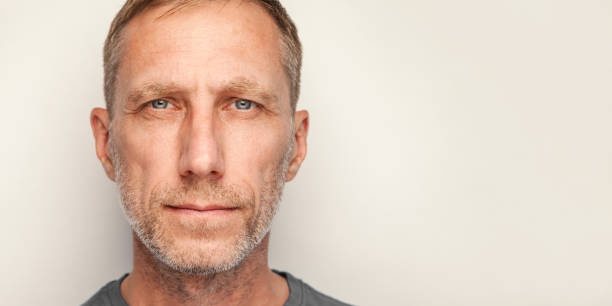
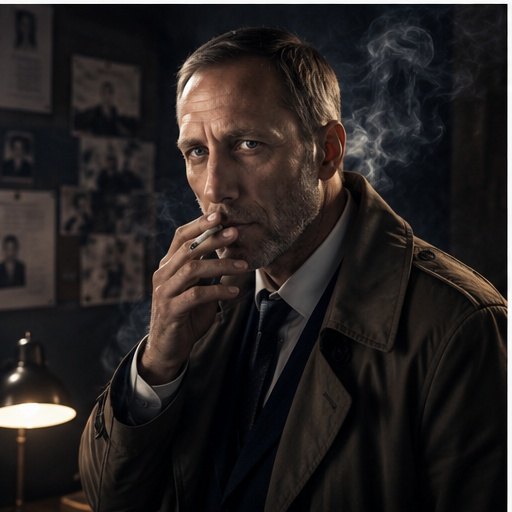
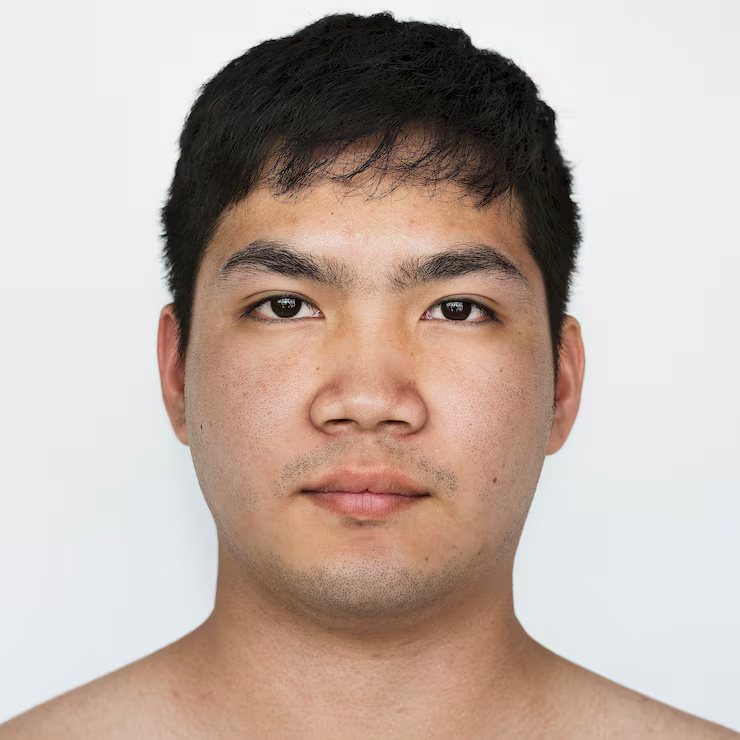
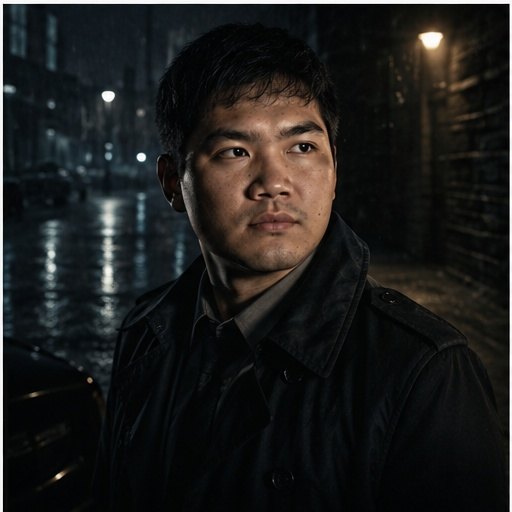
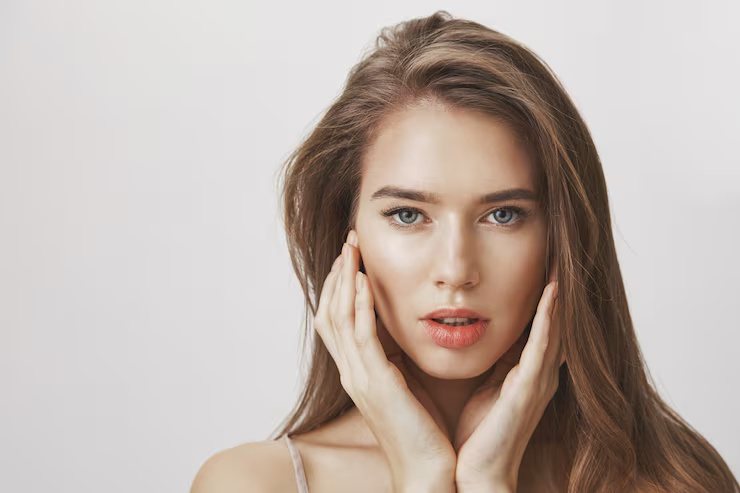
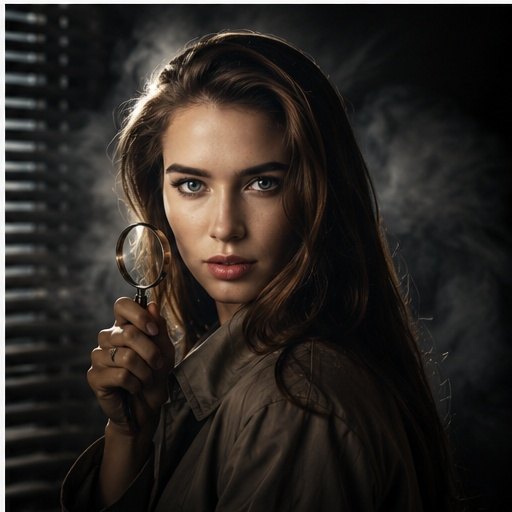
Compare the uploaded portrait references with the detective character results to see how trench coat styling, rain, old street lights, smoke and side lighting create a cinematic mystery-poster look while keeping the person recognizable.
Before reference 1After result 1. This example shows how a simple portrait can become a cinematic detective character poster while keeping the person recognizable. The result adds trench coat styling, rainy city atmosphere, old street lights, smoke and dramatic side lighting.Before reference 2After result 2. The improved prompt gives the model clear noir, lighting, wardrobe and identity-preserving instructions so the final image feels like an editorial mystery poster instead of a random costume edit.Before reference 3After result 3. Use the comparison to see how rain, smoke, wet reflections and controlled side light create a stronger detective mood without hiding the face.
Bad prompt vs improved prompt
Bad prompt
Make this person look like a detective.
Improved prompt
How to use this prompt
Upload a clear portrait where the face and hairstyle are easy to recognize.
Copy the full detective prompt and keep the identity-preserving instruction unchanged.
Use a vertical crop such as 4:5 or 3:4 for a poster-style portrait.
Adjust the background between alley, street, office or rain-streaked window.
Use the negative prompt when smoke, hands, coat details, street lights or facial features distort.
Best photo types for this prompt
For Cinematic Detective Character Portrait, choose a reference where the focal subject is readable at the intended crop. The options below support Cinematic noir detective character portrait without competing background detail.
Clear portrait uploadsWaist-up character referencesEditorial headshotsSelfies with visible facial featuresProfile images with simple backgrounds
Best settings for this AI image prompt
Aspect ratios4:5 for noir character portraits, 3:4 for vertical editorial crops, 2:3 for full detective poster compositions
Best modelsChatGPT image generation, Midjourney, Flux, Leonardo, Ideogram
Style strengthUse medium style strength to preserve facial identity and medium-high strength when you want stronger noir lighting, rain, smoke and poster atmosphere.
Input tips
Use a clear portrait or waist-up reference photo.
Keep the recognizable person instruction in the prompt.
Ask for controlled smoke and rain so the face stays readable.
Use old street lights, wet pavement and side lighting for the mystery mood.
Use the negative prompt if the result looks like a costume, changes identity or creates messy street details.
Why these instructions matter
Style direction: Cinematic noir detective character portrait
Lighting direction: Dramatic side lighting, old street lamps, smoky rain atmosphere
Camera direction: Vertical editorial poster crop, shallow depth of field
For Cinematic Detective Character Portrait, adjust one field per trial so changes to Cinematic noir detective character portrait remain distinguishable from changes to Dramatic side lighting.
Customization guide
Parameter
What to change
Expected effect
Example value
Subject or scene
Replace the main subject while keeping the prompt structure.
Changes the focal content without discarding the composition.
Cinematic Detective Character Portrait
Visual style
Change the style phrase.
Moves the result toward a different material or art direction.
Cinematic noir detective character portrait
Lighting
Replace the lighting description.
Changes contrast, depth, color temperature and mood.
Dramatic side lighting, old street lamps, smoky rain atmosphere
Camera and composition
Adjust lens, angle, crop or focal point.
Changes perspective and the amount of environment in frame.
Vertical editorial poster crop, shallow depth of field
Output format
Choose an aspect ratio supported by your image tool.
Adapts the framing for a post, poster or landscape image.
4:5 or 3:4
Negative prompt
changed identity, distorted face, duplicate face, bad eyes, bad hands, extra fingers, cheap costume, plastic skin, over-smoothed face, random text, watermark, logo, blurry face, warped trench coat, unrealistic smoke, messy rain, broken street lights, low resolution
Common mistakes
Using a blurry or cropped face photo.
Removing the keep the person recognizable instruction.
Making the smoke or shadows so heavy that the face becomes unclear.
Adding too many props, weapons or background characters.
Making the trench coat look like a cheap costume instead of realistic fabric.
Skipping negative prompt terms for changed identity, bad hands, warped coat, random text or messy rain.
FAQ
What is this detective portrait prompt used for?
Use it to turn an uploaded portrait into a cinematic detective character image with trench coat styling, rainy city atmosphere, smoke and dramatic side lighting while preserving the person identity.
Can I use this prompt in ChatGPT?
Yes. The prompt is written for ChatGPT image generation and can be copied directly with a clear uploaded portrait.
How do I keep the face recognizable?
For Cinematic Detective Character Portrait, retain the face, hairstyle and main expression instruction when the source photo already represents the intended person. Avoid making shadows, smoke or rain so heavy that the face becomes hidden.
What kind of photo works best?
A clear portrait or waist-up photo with visible facial features works best. Avoid blurry selfies, harsh filters, cropped faces and images where the head is very small.
How do I make the detective mood look cinematic?
Keep the rainy city background, old street lights, smoke, wet pavement reflections and dramatic side lighting in the prompt. These details create the noir poster mood.
Should I use the negative prompt?
Yes. It helps reduce changed identity, bad hands, plastic skin, messy smoke, warped trench coats, broken street lights, random text and watermark-like artifacts.
Can I use this prompt in Midjourney or Flux?
Yes. Keep the same visual structure and adapt model-specific settings such as aspect ratio, style strength and image reference weight.
What aspect ratio works best for this prompt?
Use 4:5 or 3:4 for character portraits. Use 2:3 when you want more coat detail or a stronger full poster composition.
Author: Image Prompt List Editorial Team. This is the site editorial team, not a fictional individual expert.
For Cinematic Detective Character Portrait, editors checked the stored prompt and available examples for topic fit, pair order, captions, metadata, duplicates and unsupported claims. Formatting checks can be automated; this approval covers the documented Cinematic noir detective character portrait and Dramatic side lighting evidence, not an unreported independent model rerun.