Generate Prompt

Portrait prompt

Dramatic Red-Carpet Celebrity Photo Prompt for ChatGPT AI Images

Copy a tested Dramatic Red-Carpet Celebrity Photo Prompt for ChatGPT image generation with examples, negative prompt, practical tips, settings and variations.

About this prompt

Use this Dramatic Red-Carpet Celebrity Photo Prompt to create a polished AI image from a clear uploaded portrait while keeping the person recognizable. The prompt is designed for ChatGPT image generation and can also be adapted for other AI image tools when you need stronger style direction, better composition and more consistent facial details. It helps define the face, pose, outfit, lighting, background, mood and final image quality without turning the subject into a generic character. Use it when the uploaded photo needs a stronger visual concept but the identity, hairstyle and main expression still need to stay stable. This page includes the full prompt, negative prompt, before-and-after examples when available, usage tips, prompt variations, common mistakes, recommended settings and related prompt ideas so you can copy the prompt, adjust it quickly and get a more predictable result.

Copy this prompt

Use the tested version as-is, then customize the subject, style, lighting and mood in your image tool.

Best for

ChatGPTPortraitReference photoBefore/After
Improved prompt
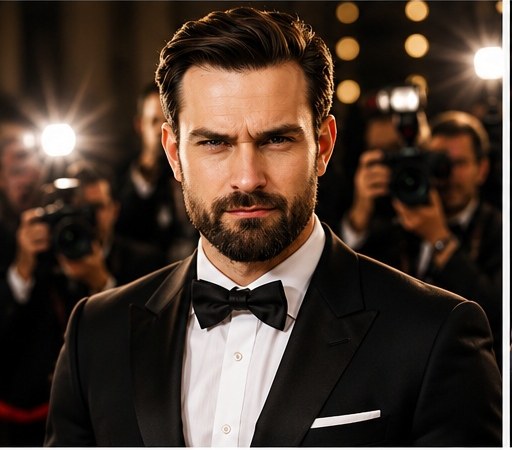
Transform the uploaded portrait into a dramatic red-carpet celebrity photo. Keep the person recognizable, add elegant outfit, camera flashes, velvet ropes, blurred photographers, glossy evening lighting, and glamorous event photography style.

Before and after examples

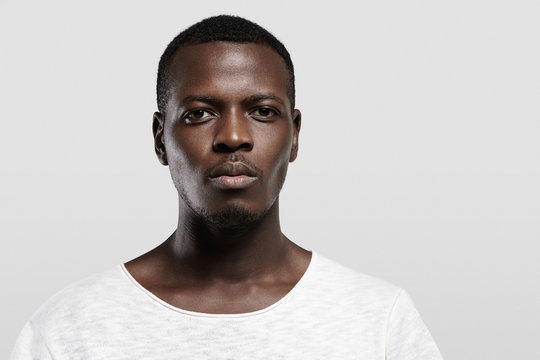
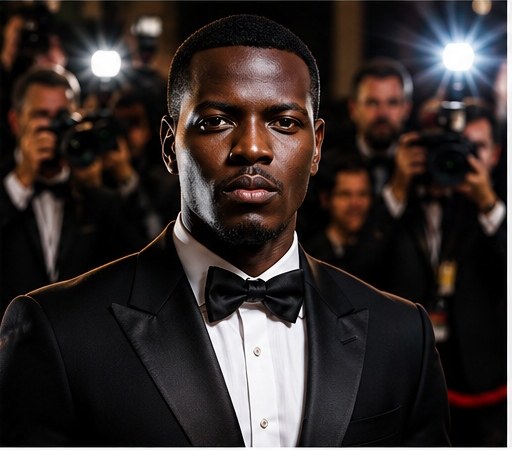
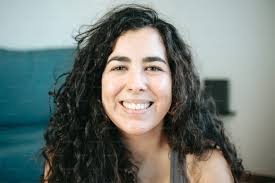
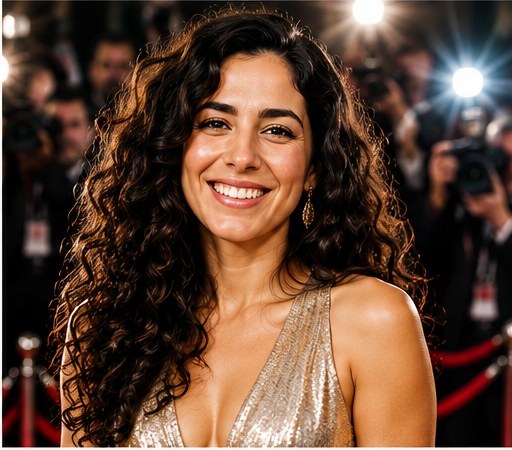
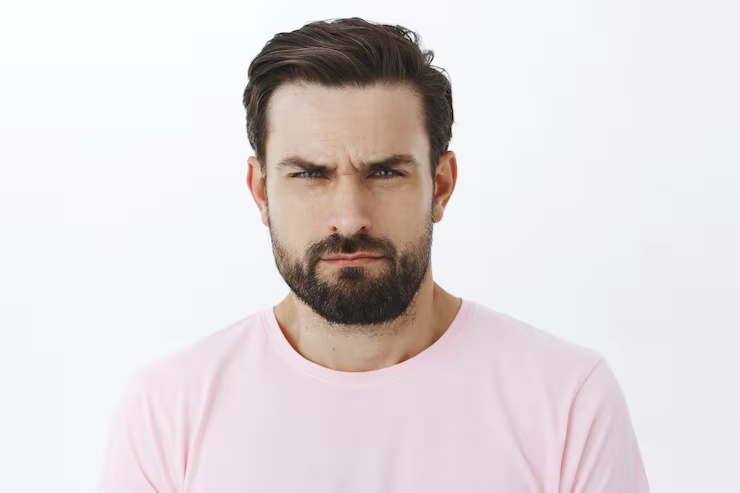
These examples show how a simple uploaded portrait can become a glamorous red-carpet celebrity photo while keeping the person recognizable. The improved result adds elegant outfit styling, flash photography, velvet ropes, blurred photographers and glossy evening light.

Dramatic Red-Carpet Celebrity Photo Prompt source portrait example 1
Before reference 1
AI portrait result created with Dramatic Red-Carpet Celebrity Photo Prompt example 1
After result 1. This example shows how a simple portrait reference can become a polished AI image while keeping the person recognizable. The result improves the lighting, styling, background and overall composition without losing the main facial identity.
Dramatic Red-Carpet Celebrity Photo Prompt source portrait example 2
Before reference 2
AI portrait result created with Dramatic Red-Carpet Celebrity Photo Prompt example 2
After result 2. Use the before-and-after comparison to see how identity preservation, style direction and negative prompt details make the final image more controlled.
Dramatic Red-Carpet Celebrity Photo Prompt source portrait example 3
Before reference 3
AI portrait result created with Dramatic Red-Carpet Celebrity Photo Prompt example 3
After result 3. This example shows how a simple portrait reference can become a polished AI image while keeping the person recognizable. The result improves the lighting, styling, background and overall composition without losing the main facial identity.

Bad prompt vs improved prompt

Bad prompt

Make this portrait look like a celebrity on a red carpet.

Improved prompt

Transform the uploaded portrait into a dramatic red-carpet celebrity photo. Keep the person recognizable, add elegant outfit, camera flashes, velvet ropes, blurred photographers, glossy evening lighting, and glamorous event photography style.

How to use this prompt

  1. Start with a clear image idea or upload a source photo when the prompt is designed for a recognizable person, product or object.
  2. Copy the Dramatic Red-Carpet Celebrity Photo Prompt and keep the main subject, style, lighting, camera and composition instructions together.
  3. Replace bracketed placeholders with your own subject, outfit, background, mood, product details or scene requirements.
  4. Add the negative prompt when the result needs cleaner hands, faces, text, logos, shadows, proportions or background detail.
  5. Generate one version first, then refine only the weakest part: pose, lighting, crop, realism, style strength or unwanted artifacts.

Best photo types for this prompt

Use source images that make the main subject easy to understand. These input types usually give the model enough visual context without adding unnecessary clutter.

Clear portrait uploadsSelfies with visible facial featuresWaist-up fashion photosEditorial headshotsCharacter reference photos

Best settings for this AI image prompt

Aspect ratios4:5
Best modelsChatGPT, Midjourney, Flux, Leonardo, Ideogram
Style strengthUse medium strength for realistic portraits and higher strength for painterly, fantasy or editorial looks.

Input tips

  • Use a clear face photo with natural detail.
  • Avoid heavy filters, blur and extreme crops.
  • Keep identity instructions in the prompt.
  • Use the negative prompt when hands, jewelry, fabric or facial details distort.

Prompt variations

Use these variations when the first result is close, but you need a different finish, crop or level of realism.

Cinematic red-carpet entrance prompt

Cinematic red-carpet entrance prompt
Transform the uploaded portrait into a cinematic red-carpet entrance photo. Keep the person recognizable, add elegant formalwear, flash photography, velvet ropes, glossy evening light, blurred photographers and a dramatic event backdrop.

Luxury award-night portrait prompt

Luxury award-night portrait prompt
Transform the uploaded person into a luxury award-night celebrity portrait. Keep the face recognizable, add refined outfit styling, warm spotlights, soft flash reflections, a crowded press line and a glamorous evening photography mood.

Fashion editorial red-carpet prompt

Fashion editorial red-carpet prompt
Transform the uploaded portrait into a fashion editorial red-carpet photo. Keep the identity recognizable, emphasize outfit details, polished styling, camera flashes, shallow depth of field and premium magazine event photography.

Cinematic portrait version

Cinematic portrait version
Create a cinematic portrait version of Dramatic Red-Carpet Celebrity Photo Prompt. Keep the person recognizable, add dramatic lighting, stronger depth, clean background control, realistic details and a polished editorial finish.

Realistic editorial version

Realistic editorial version
Create a realistic editorial version of Dramatic Red-Carpet Celebrity Photo Prompt. Keep the facial identity natural, use believable lighting, balanced colors, refined styling and a magazine-quality composition.
Negative prompt
changed identity, distorted face, bad hands, extra fingers, warped eyes, plastic skin, fake smile, unreadable text, watermark, signature, messy background, harsh overexposure, duplicate people, distorted clothing, low-resolution artifacts
Common mistakes

  • Using a blurry or cropped face photo.
  • Removing the instruction to keep the person recognizable.
  • Making the style so extreme that the face or outfit identity changes.
  • Overloading clothing, background and lighting details in one prompt.
  • Skipping the negative prompt for hands, eyes, face shape and background artifacts.
  • Using a heavily filtered selfie as the only reference image.

FAQ

Can I use this prompt with an uploaded portrait?

Yes. Use a clear portrait so the model can preserve the person’s facial features while changing the setting, outfit and lighting into a red-carpet event scene.

How do I keep the person recognizable?

Keep the identity instruction in the prompt and mention the facial features, hairstyle and outfit colors that should remain consistent. Avoid pushing the style so hard that the face becomes generic.

What makes the result feel like a red-carpet photo?

Camera flashes, velvet ropes, blurred photographers, evening lighting, polished outfit styling and shallow depth of field all help create the celebrity event mood.

What negative prompt should I use?

Use negative terms for changed identity, distorted face, bad hands, harsh overexposure, duplicate people, messy background and warped clothing.

What is this prompt used for?

Use Dramatic Red-Carpet Celebrity Photo Prompt to create a more controlled AI image from a clear idea or uploaded reference. It helps define the subject, style, lighting, composition and final quality.

Can I use this prompt in ChatGPT?

Yes. The prompt is written for ChatGPT image generation and uses natural language instructions that are easy to copy, edit and refine.

Can I use this prompt in Midjourney or Flux?

Yes. You can adapt the wording for Midjourney, Flux, Leonardo or other image tools, but model-specific parameters and aspect ratios may need small changes.

How do I get better results from this prompt?

Use a clear subject, keep the strongest style instructions, add the negative prompt and refine only the weakest part of the first result. Small targeted edits work better than rewriting everything.

Related resources