Realistic Paparazzi Street Photo Prompt for ChatGPT AI Images
Copy a curated paparazzi street photo prompt for ChatGPT image generation with candid pose, urban flash lighting, examples, negative prompt and tips.
About this prompt
Use this realistic paparazzi street photo prompt to transform an uploaded portrait into a candid celebrity-style street image while keeping the person recognizable. The prompt is designed for ChatGPT image generation and works well when you want urban flash lighting, natural motion, slightly imperfect framing, street-style styling, and a believable paparazzi mood instead of a polished studio portrait. Use it for celebrity-style edits, fashion-week street looks, social media portraits, editorial concepts, and realistic AI portrait transformations.
Copy this prompt
Use the curated prompt as a starting point, then customize the subject, style, lighting and mood in your image tool.
Create a realistic paparazzi-style street photo from the uploaded portrait. Keep the person recognizable, preserve the main facial features, hairstyle, expression, skin tone, and outfit cues, then place them in a candid walking pose on an urban street. Add celebrity street-style energy, camera flash, slight motion blur, imperfect framing, natural skin texture, realistic street shadows, background pedestrians or parked cars softly out of focus, subtle grain, lens compression, and spontaneous nightlife or daytime paparazzi photography mood. Make it feel like a real candid street photo, not a posed studio portrait or polished fashion campaign.
Before and after examples
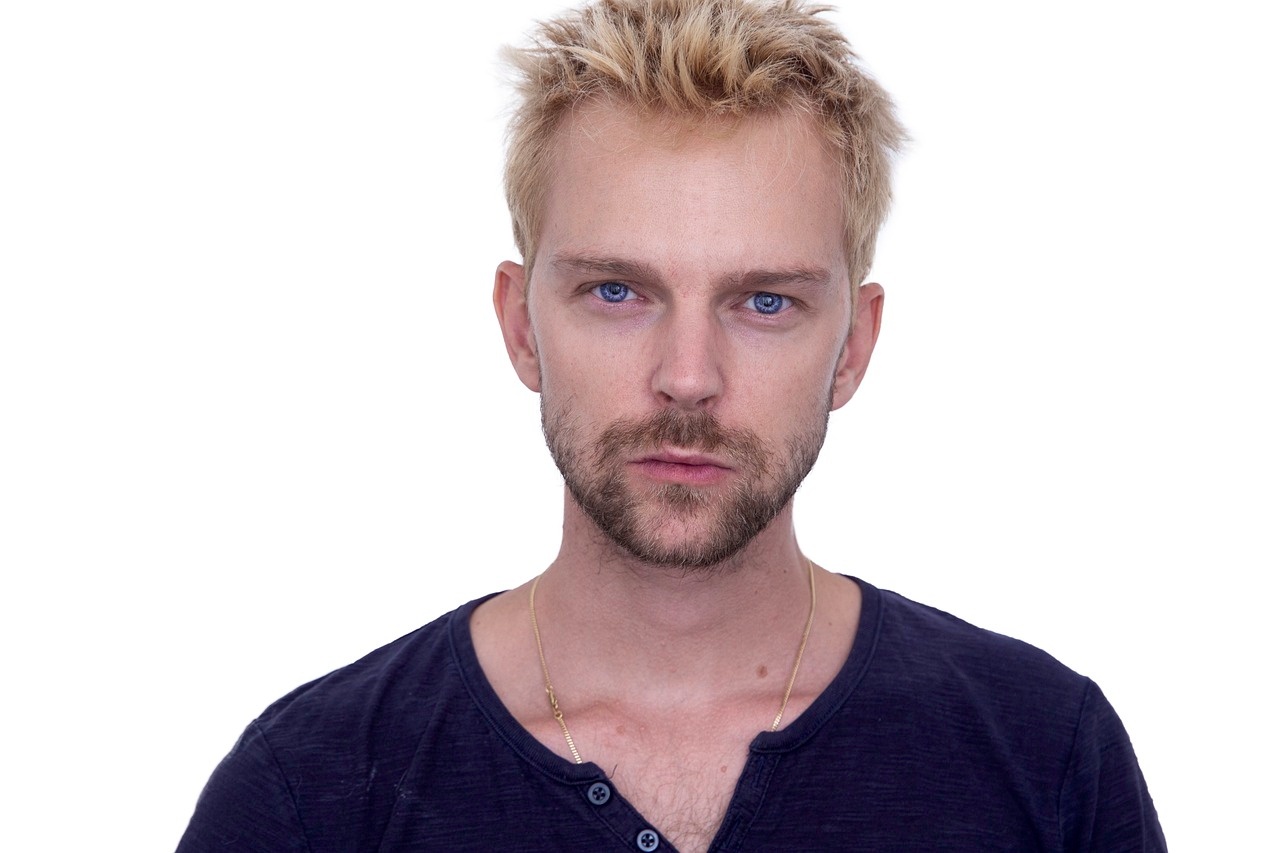
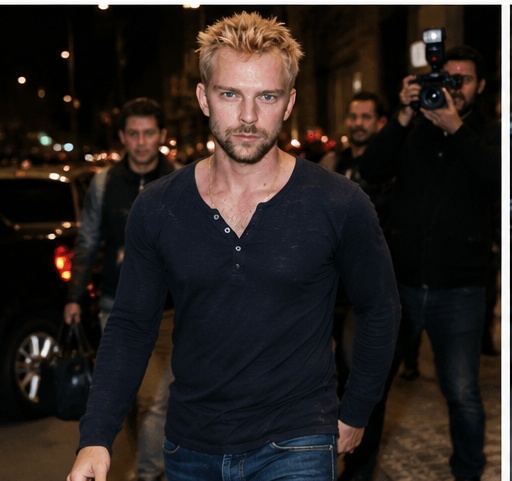
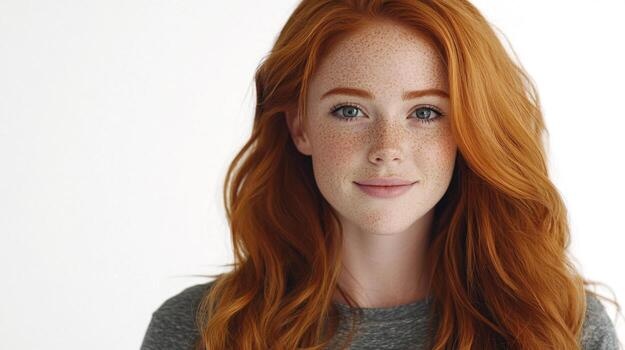
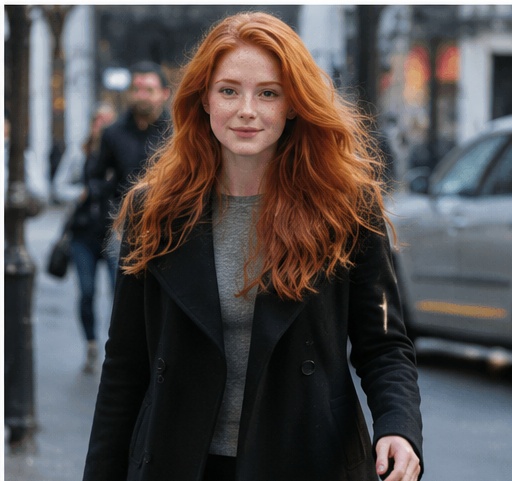
Before reference 1After result 1. This example shows how a clear portrait can become a realistic paparazzi-style street photo while keeping the person recognizable. The result adds candid movement, urban flash lighting, natural grain and an imperfect street-photography frame.
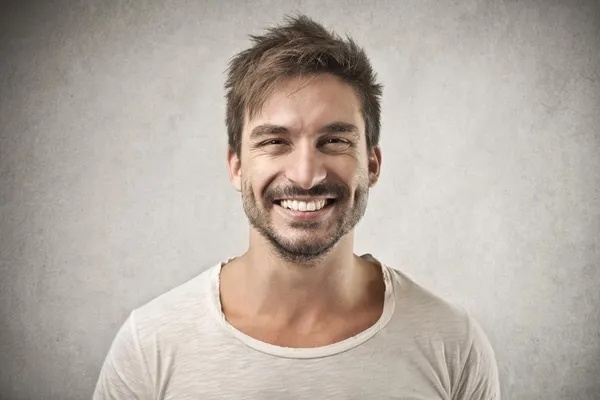
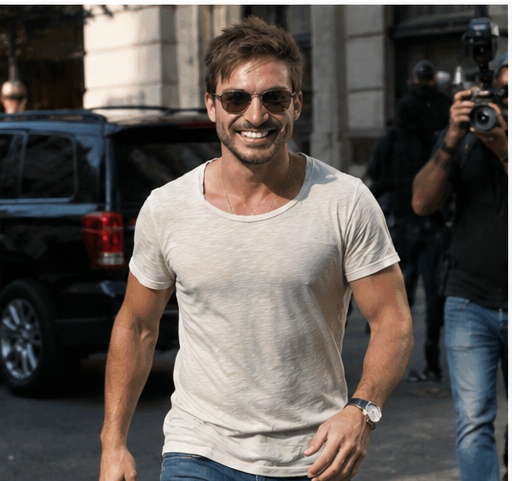
Before reference 2After result 2. The stronger prompt gives the model a celebrity street-photo context, so the output feels spontaneous instead of polished like a studio portrait.
Before reference 3After result 3. Use the comparison to see how flash, motion, city background and negative prompt cleanup make the final image feel more believable.
This paparazzi-style prompt works because it asks for controlled imperfection. It keeps the uploaded person recognizable, then adds candid walking movement, urban background depth, camera flash, slight motion blur and street-style energy.
How to adapt it
For a nighttime celebrity look, add wet pavement, stronger flash, black car reflections and nightlife background. For a daytime street-style photo, use softer shadows, fashion-week sidewalk energy and natural city light.
Best use cases
Celebrity street-style portrait edits
Candid urban lifestyle photos
Fashion-week inspired profile images
Realistic paparazzi photo transformations
Bad prompt vs improved prompt
Bad prompt
Make this person look like a celebrity on the street.
Improved prompt
Best settings for this AI image prompt
Aspect ratios4:5 for social portraits, 3:4 for vertical street-style images, 2:3 for full-body celebrity street shots
Best modelsChatGPT image generation, Midjourney, Flux, Leonardo, Ideogram
Style strengthUse medium strength for realistic candid street photos and medium-high strength for stronger camera flash and celebrity paparazzi mood.
Input tips
Use a clear portrait or waist-up reference photo.
Keep the recognizable person instruction.
Add urban background, camera flash, slight motion blur and imperfect framing.
Avoid over-polished studio lighting.
Use the negative prompt if the result looks fake, plastic, too posed or changes identity.
Prompt variations
Use these variations when the first result is close, but you need a different finish, crop or level of realism.
Nighttime paparazzi flash version
Nighttime paparazzi flash version
Transform the uploaded person into a realistic nighttime paparazzi street photo. Keep the person recognizable, add strong on-camera flash, dark city background, slight motion blur, reflective pavement, candid walking pose, natural skin texture, and imperfect celebrity street-photo framing.
Fashion week street-style version
Fashion week street-style version
Transform the uploaded person into a realistic fashion week street-style paparazzi photo. Keep the face recognizable, add a stylish outfit, urban sidewalk background, camera flash, shallow depth of field, candid movement, natural grain, and editorial street photography mood.
Luxury car arrival version
Luxury car arrival version
Transform the uploaded person into a realistic paparazzi photo while arriving beside a luxury car at night. Keep the person recognizable, add flash lighting, city reflections, candid pose, subtle motion blur, dark street background, natural skin texture, and authentic celebrity arrival atmosphere.
Daytime candid street version
Daytime candid street version
Transform the uploaded person into a realistic daytime candid street photo. Keep the person recognizable, add natural city light, casual walking pose, urban background, slight lens compression, street photography framing, realistic clothing details, and an unposed paparazzi-style mood.
Rainy city paparazzi version
Rainy city paparazzi version
Transform the uploaded person into a realistic rainy city paparazzi photo. Keep the face recognizable, add wet pavement reflections, umbrella or coat details, camera flash, moody street lighting, slight motion blur, candid expression, natural grain, and believable urban atmosphere.
Using a studio portrait with no street-style context.
Removing the camera flash or candid walking pose.
Making the result too polished like a fashion campaign.
Adding too many background pedestrians or cars.
Using motion blur so strong that the face becomes unclear.
Skipping negative prompt terms for fake watermarks, warped cars, bad hands or changed identity.
FAQ
What makes this paparazzi street photo prompt look realistic?
It combines identity preservation with candid movement, on-camera flash, urban background detail, natural grain and slightly imperfect framing. Those details make the image feel photographed instead of staged.
Can I use this prompt for celebrity street-style edits?
Yes. It works well for celebrity-style portraits, fashion-week street looks and editorial social images when the uploaded portrait is clear enough to preserve the face.
How do I avoid a staged or studio-looking result?
Keep the candid walking pose, urban background, camera flash and slight motion blur in the prompt. Avoid clean studio lighting, perfect symmetry and overly posed expressions.
What negative prompt works best for paparazzi-style images?
Use negative terms for fake watermarks, warped cars, distorted hands, changed identity, plastic skin, extra fingers, messy background text and over-polished studio lighting.
Can I use this prompt in ChatGPT?
Yes. The prompt is written for ChatGPT image generation and can be copied directly with an uploaded portrait.
Can I use this prompt in Midjourney or Flux?
Yes. Keep the same visual structure and adapt model-specific parameters such as aspect ratio, style strength and image reference weight.
How do I keep the person recognizable?
Use a clear face photo and keep the instruction to preserve the person’s facial identity, hairstyle and main expression. Do not make the blur or flash so strong that the face disappears.
What kind of photo works best for this prompt?
A clear portrait or waist-up reference with visible face and natural detail works best. Avoid heavy filters, sunglasses, extreme crops and low-resolution images.