Generate Prompt

Portrait prompt

AI Parallel Lives Selfie Prompt for ChatGPT AI Images

Copy a tested AI Parallel Lives Selfie Prompt for ChatGPT image generation with examples, negative prompt, practical tips, settings and variations.

About this prompt

Use this AI Parallel Lives Selfie Prompt to create a polished AI image from a clear uploaded portrait while keeping the person recognizable. The prompt is designed for ChatGPT image generation and can also be adapted for other AI image tools when you need stronger style direction, better composition and more consistent facial details. It helps define the face, pose, outfit, lighting, background, mood and final image quality without turning the subject into a generic character. Use it when the uploaded photo needs a stronger visual concept but the identity, hairstyle and main expression still need to stay stable. This page includes the full prompt, negative prompt, before-and-after examples when available, usage tips, prompt variations, common mistakes, recommended settings and related prompt ideas so you can copy the prompt, adjust it quickly and get a more predictable result.

Copy this prompt

Use the tested version as-is, then customize the subject, style, lighting and mood in your image tool.

Best for

ChatGPTPortraitSocial media
Improved prompt
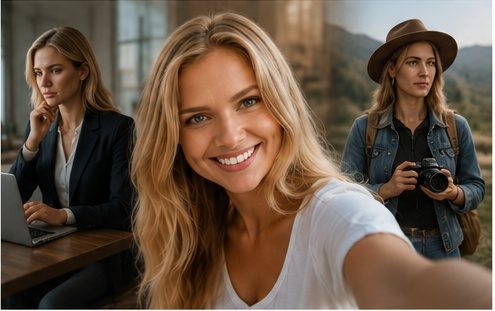
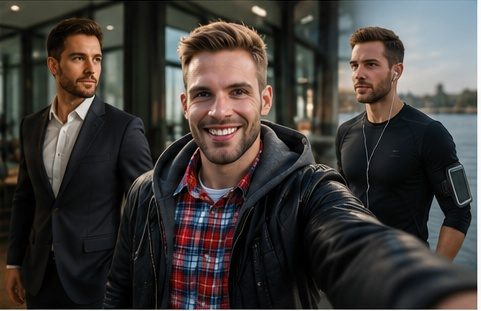
Create a cinematic "parallel lives selfie" from the uploaded photo. Keep the person clearly recognizable and preserve their natural facial features, hairstyle, expression, and identity. Show the person as the main version in the foreground, taking a realistic phone selfie, while two subtle alternate versions of the same person appear naturally in the background as if they are living different paths: one version as a successful future self, another version as a creative or adventurous life. Make all versions look like the same person, not different people. Place the scene in a modern cinematic environment with soft reflections, glass, city lights, warm ambient lighting, and shallow depth of field. Use realistic skin texture, natural colors, subtle film grain, and premium editorial composition. The mood should feel emotional, inspiring, and mysterious, like a visual metaphor for different possible futures. Make it believable, not fantasy, not sci-fi, and not like a poster.

Before and after examples
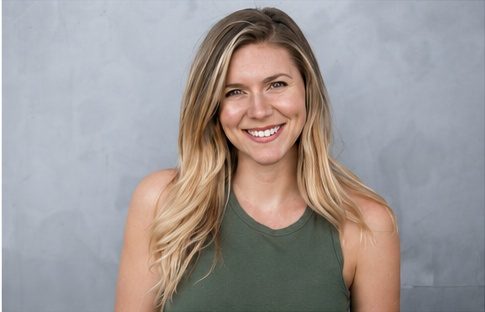
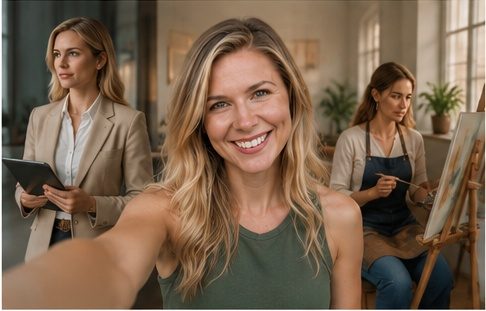
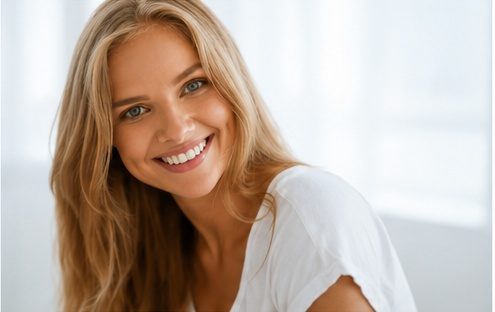
AI Parallel Lives Selfie Prompt source portrait example 1
Before reference 1
AI portrait result created with AI Parallel Lives Selfie Prompt example 1
After result 1. This example shows how a portrait can become a cinematic parallel-lives selfie while keeping the person recognizable. The improved prompt controls the foreground selfie, subtle background versions, soft reflections and emotional city mood.
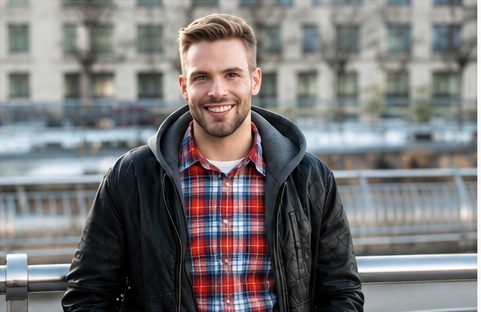
AI Parallel Lives Selfie Prompt source portrait example 2
Before reference 2
AI portrait result created with AI Parallel Lives Selfie Prompt example 2
After result 2. The stronger prompt explains that the background figures should look like possible futures of the same person, not unrelated people. That identity instruction helps the result stay believable and cohesive.
AI Parallel Lives Selfie Prompt source portrait example 3
Before reference 3
AI portrait result created with AI Parallel Lives Selfie Prompt example 3
After result 3. Use the comparison to see how realistic skin texture, shallow depth of field, ambient lighting and negative prompt cleanup prevent sci-fi portals, poster effects and duplicated-face glitches.

Bad prompt vs improved prompt

Bad prompt

Make this selfie show alternate lives in the background.

Improved prompt

Create a cinematic "parallel lives selfie" from the uploaded photo. Keep the person clearly recognizable and preserve their natural facial features, hairstyle, expression, and identity. Show the person as the main version in the foreground, taking a realistic phone selfie, while two subtle alternate versions of the same person appear naturally in the background as if they are living different paths: one version as a successful future self, another version as a creative or adventurous life. Make all versions look like the same person, not different people. Place the scene in a modern cinematic environment with soft reflections, glass, city lights, warm ambient lighting, and shallow depth of field. Use realistic skin texture, natural colors, subtle film grain, and premium editorial composition. The mood should feel emotional, inspiring, and mysterious, like a visual metaphor for different possible futures. Make it believable, not fantasy, not sci-fi, and not like a poster.

How to use this prompt

  1. Upload a clear portrait or selfie with visible facial features.
  2. Copy the full prompt and keep the identity-preserving instructions for all versions of the person.
  3. Choose realistic alternate life ideas such as future self, traveler, artist, entrepreneur or another believable path.
  4. Keep the scene cinematic with glass, city lights, warm ambience and shallow depth of field.
  5. Use the negative prompt if the output creates different people, sci-fi portals, duplicated face glitches or messy composition.

Best photo types for this prompt

Use source images that make the main subject easy to understand. These input types usually give the model enough visual context without adding unnecessary clutter.

Clear selfiesWaist-up portraitsLifestyle photosEditorial headshotsSocial media profile photos

Best settings for this AI image prompt

Aspect ratios4:5 for vertical social portraits, 3:4 for selfie framing, 16:9 for wider cinematic storytelling
Best modelsChatGPT image generation, Midjourney, Flux, Leonardo, Ideogram
Style strengthUse medium style strength so the alternate versions stay believable and do not turn into fantasy characters. Increase slightly only for stronger cinematic lighting.

Input tips

  • Use a clear portrait or selfie with visible facial features.
  • Keep the same-person identity instruction for all versions.
  • Limit the background versions to two so the composition stays readable.
  • Use realistic city reflections, glass and shallow depth of field instead of sci-fi portals.
  • Use the negative prompt if the result creates different people, duplicated face glitches or messy composition.

Prompt variations

Use these variations when the first result is close, but you need a different finish, crop or level of realism.

Cinematic portrait version

Cinematic portrait version
Create a cinematic portrait version of AI Parallel Lives Selfie Prompt. Keep the person recognizable, add dramatic lighting, stronger depth, clean background control, realistic details and a polished editorial finish.

Realistic editorial version

Realistic editorial version
Create a realistic editorial version of AI Parallel Lives Selfie Prompt. Keep the facial identity natural, use believable lighting, balanced colors, refined styling and a magazine-quality composition.

Fashion street portrait version

Fashion street portrait version
Create a fashion street portrait version of AI Parallel Lives Selfie Prompt. Keep the person recognizable, add stylish clothing, natural movement, urban background detail, editorial lighting and a confident portrait mood.

Painterly portrait version

Painterly portrait version
Create a painterly portrait version of AI Parallel Lives Selfie Prompt. Preserve the main facial features, add refined texture, soft brushwork, warm lighting, detailed clothing and a classic portrait composition.

Social media profile version

Social media profile version
Create a social media profile version of AI Parallel Lives Selfie Prompt. Keep the person recognizable, use a clean crop, strong focal point, clear background separation and a polished square or vertical layout.
Negative prompt
No distorted face, no changed identity, no different people, no celebrity likeness, no extra fingers, no broken hands, no warped phone, no plastic skin, no over-retouching, no cartoon style, no sci-fi portals, no neon overload, no duplicated face glitches, no unreadable text, no fake logos, no horror mood, no messy composition.

Common mistakes

  • Using a blurry or heavily filtered selfie.
  • Forgetting to say that all versions must look like the same person.
  • Adding too many alternate versions in the background.
  • Making the concept too sci-fi with portals or neon overload.
  • Letting the background compete with the foreground selfie.
  • Skipping negative prompt terms for different people, duplicated face glitches, warped phone or messy composition.

FAQ

What is this parallel lives selfie prompt used for?

Use it to turn a portrait into a cinematic phone selfie where subtle background versions suggest different possible futures. The goal is emotional, believable and editorial rather than fantasy or sci-fi.

Can I use this prompt in ChatGPT?

Yes. The prompt is written for ChatGPT image generation and can be copied directly with an uploaded portrait or selfie.

How do I keep the person recognizable?

Use a clear source portrait and keep the instruction to preserve natural facial features, hairstyle, expression and identity. The background versions should be described as the same person, not separate characters.

Why might the alternate versions look like different people?

That usually happens when the prompt asks for multiple people without repeating the identity rule. Keep the wording that all versions must look like the same person.

What kind of photo works best?

A clear selfie, portrait or waist-up image works best. Avoid heavy filters, covered faces, extreme crops and very low-resolution images.

Can I change the alternate life ideas?

Yes. Replace the successful future self or creative traveler with a musician, entrepreneur, athlete, parent, artist or another realistic life path.

Can I use this prompt in Midjourney or Flux?

Yes. Keep the same identity and composition instructions, then adapt aspect ratio, image reference strength and model-specific parameters.

What negative prompt should I use?

Use negative terms for changed identity, different people, duplicated face glitches, warped phone, extra fingers, plastic skin, fake logos, sci-fi portals and messy composition.

Related resources