This prompt is built for a very specific kind of realism: a phone photo that looks unplanned, slightly flawed, and almost too casual to feel like a generated image. Instead of asking for a polished selfie, it pushes the model toward a failed iPhone snapshot with motion blur, uneven exposure, a strange low angle, and a frame that feels caught while the phone was being pulled from a pocket. The goal is not beauty lighting or a clean portrait. The goal is believable imperfection. Use this structure when you want an AI image to look like an accidental camera roll moment rather than a composed character render.
Original Prompt Idea Summary
The original idea asks ChatGPT to create a photo of itself as if it were a casual iPhone snapshot: no strong composition, no obvious subject treatment, slight motion blur, unbalanced lighting, mild overexposure, a weird angle, and a messy accidental selfie feel.
Improved Prompt
Create an ordinary accidental iPhone snapshot of an anonymous person, as if the camera opened while the phone was being pulled out of a pocket. No intentional composition, no polished portrait lighting, no obvious pose. Use a strange low angle, close lens distance, messy cropped frame, slight motion blur, imperfect focus, uneven interior lighting, one mildly overexposed bright window or edge, casual camera-roll realism, natural phone noise, unedited colors, awkward everyday framing, excessively real and unplanned.Negative Prompt
professional portrait, studio lighting, cinematic composition, fashion editorial, beauty retouching, perfect symmetry, centered subject, crisp product photo, clean background, intentional pose, glamour selfie, sharp controlled focus, dramatic color grading, perfect exposure, flawless skin, advertisement, watermark, text, logo, extra fingers, distorted anatomy, duplicated face, heavy blur, unusable faceSource And Result Images
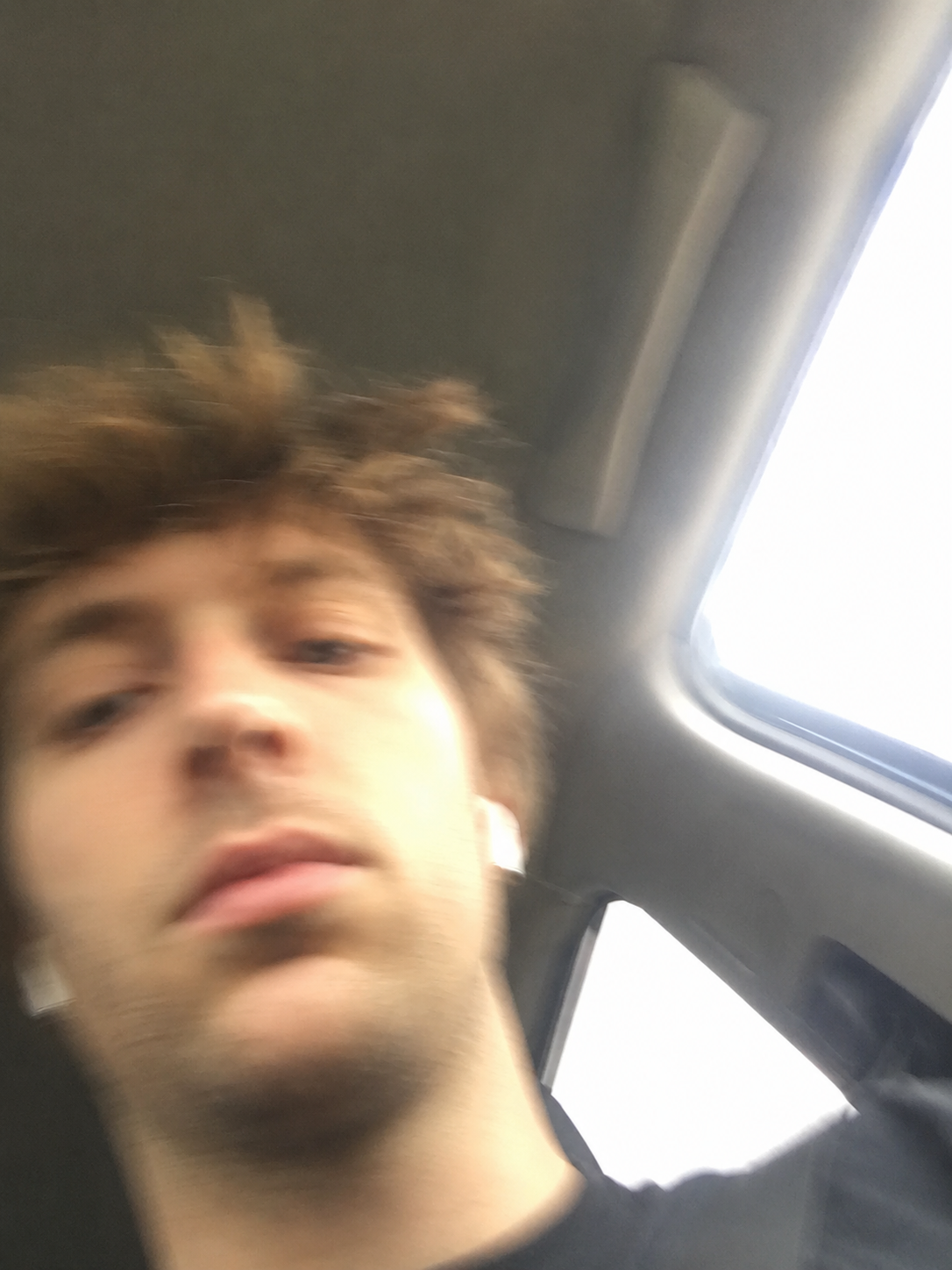
No separate source image is needed for this prompt. It is a direct text-to-image test designed to produce a flawed phone-camera result. The provided result example shows a low-angle, close cropped phone snapshot with a blurred face near the lower-left part of the frame, a bright overexposed window area on the right, and a tilted interior background. The image reads as a momentary accidental selfie rather than a deliberate portrait.
Result Image Analysis
The result works because it avoids the usual signs of a polished AI portrait. The face is too close to the lens, the angle is awkward, and the framing gives more space to the surrounding interior than a normal portrait photographer would choose. Motion blur softens the facial details and hair, while the bright window area creates a harsh exposure imbalance. That combination makes the image feel like a quick phone capture instead of a controlled studio render.
The main weakness is that the image can become too blurry if the model overemphasizes motion. A little blur helps the accidental effect, but too much blur can erase useful facial structure and make the result look like a technical failure rather than a believable snapshot.
Recommended Settings
- Model: ChatGPT image generation or another image model that understands natural-language photography cues.
- Aspect ratio: 3:4 or 4:5 vertical for a phone-photo feel.
- Style: Ordinary smartphone photo, casual selfie, unplanned framing.
- Lighting: Mixed interior light with one overexposed window or bright edge.
- Camera feel: Low angle, close lens distance, slight shake, imperfect focus.
Why This Prompt Works
Most image prompts accidentally ask for quality by stacking words like sharp, cinematic, balanced, detailed, and professional. This prompt does the opposite. It gives the model permission to make photographic mistakes that real phones make all the time: uneven exposure, accidental cropping, motion blur, tilted perspective, and a frame with too much irrelevant background. Those flaws are the visual evidence that sells the casual snapshot effect.
Prompt Variations
- Pocket pull version: Add "the frame is half-blocked by motion, as if the camera opened while being pulled from a jacket pocket."
- Car interior version: Add "inside a car or train, bright window on one side, dark interior ceiling, awkward low angle."
- Night version: Add "dim room, phone flash slightly too strong, grainy shadows, uneven skin tones."
- Camera roll version: Add "looks like a forgotten photo buried in the camera roll, not selected or edited."
Common Mistakes
- Adding too many beauty or portrait terms, which makes the image look intentional.
- Using "cinematic" or "editorial" when the target is ordinary phone-camera realism.
- Making the subject too centered, too sharp, or too well lit.
- Overdoing blur until the image loses the casual selfie read.
- Asking for a real person's identity or personal traits instead of describing only the visual photo effect.
FAQ
Can this prompt be used for anonymous characters?
Yes. Replace any personal wording with "an anonymous person" or "a fictional casual subject" and keep the focus on the phone-photo style.
Should the image be sharp?
Only partly. Keep enough facial structure and scene detail to read the image, but allow slight motion blur and soft focus.
What makes the result look like an iPhone snapshot?
The strongest cues are vertical framing, close lens distance, awkward low angle, uneven light, overexposed highlights, and a frame that feels unplanned.
Can I use this with a reference photo?
Yes, but describe the transformation as a style and camera effect. Avoid identity claims or sensitive personal interpretation.
Related Internal Links
Try the AI image prompt generator, browse more AI image prompts, compare before and after prompt examples, improve failed outputs with negative prompts, and explore ChatGPT prompts or ChatGPT image prompts. For related portrait framing ideas, see the portrait prompts category.